Wordstat without a browser: Yandex Cloud API parser
A large part of my work is semantics and keyword research: frequencies, exact-match forms, and expanding the core via Yandex Wordstat “Popular” suggestions. Doing this manually is unacceptable, especially at scale.
I used to rely on an A-Parser preset for Wordstat, but Yandex changed the endpoint and the preset needed patching — I decided not to wait for support and built my own solution.
I put together a small Python script for the official Cloud Search API (topRequests): no browser, with a queue, progress tracking, and clean quota stops.
→ github.com/google-dad/wordstat-parser-api
Why I need this in an SEO workflow
Typical tasks where Wordstat is still useful:
- estimate demand for a keyword list (broad / exact / precise match);
- expand the core: pull “Popular” suggestions from a seed and filter noise;
- run a large list overnight and pick up an Excel file in the morning instead of sitting at the screen.
I used to hit limits with UI scraping. Now I care more about a stable API contract, clear errors (401/403/429/400), and the ability to resume where I left off.
What 1000 queries cost
As volume grows, I compare not only convenience but cost per unit of work — one seed, one frequency, or one “Popular” pull. Below are benchmarks for three options I actually considered.
| Service | Billing model | ₽ per 1000 requests | Limits | What counts as “1 request” |
|---|---|---|---|---|
| My script (Yandex Cloud API) | Pay-as-you-go + 4000 ₽ / 2 mo grant on signup | ~20 ₽ | ~100 requests/hour by default (quota via support) | 1 topRequests call = 1 API request; up to 2000 phrases |
| XMLRiver (Wordstat) | Prepaid balance | 25 ₽ (base); from 12 ₽ with 50,000 ₽ prepay tier | No hard subscription; balance-based | 1 Wordstat “page” = seed frequency + up to 2000 refinements |
| Word Keeper Micro | 749 ₽ / month | ~30 ₽ (749 ÷ 25) | 25,000 limits / month | 1 submitted phrase = 1 limit |
The Yandex API is paid: ~0.02 ₽ per call ≈ 20 ₽ per 1000. But when you sign up at Yandex Cloud and link a card, as of August 2026 you get a 4000 ₽ starter grant for 2 months — roughly ~200,000 API calls (4000 ÷ 0.02). For a first semantic run that often means no out-of-pocket cost until the balance runs out. Yandex may change grant terms — I always check billing in the console before starting.
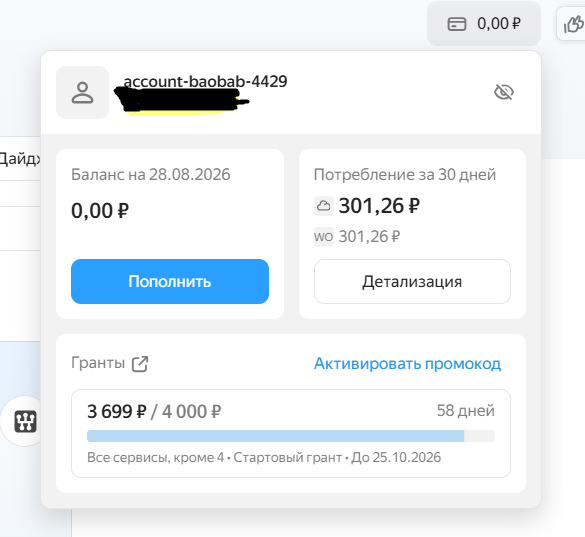
Fig. 5. Billing: 4000 ₽ starter grant, remaining balance and expiry (August 2026)
The screenshot shows ~301 ₽ consumed over 30 days and grant remainder: a first semantic run fits within the free balance, not your own money.
At 25,000 operations (same as Word Keeper Micro tier):
| At 25,000 operations | Approximate cost |
|---|---|
| Yandex API (script) | ~500 ₽ (25 × 20 ₽), if quota allows |
| XMLRiver (base) | ~625 ₽ (25 × 25 ₽) |
| Word Keeper Micro | 749 ₽ fixed / month |
Verdict: is my script the cheapest?
Among the options compared per API call — yes: ~20 ₽ / 1000, cheaper than base XMLRiver (25 ₽) and Word Keeper Micro (~30 ₽). With the 4000 ₽ grant, the first months are effectively 0 ₽ out of pocket until the balance runs out.
In absolute market terms — not always: XMLRiver with large prepay starts from 12 ₽ / 1000; with b+e+p mode in my script ≈ 60 ₽ / 1000 phrases (three calls per seed).
Word Keeper is not about the lowest per-request price — it’s about subscription, UI, and ready-made tools without Cloud and Python setup.
Everyone counts units differently — comparison is approximate. I also keep in mind Yandex’s ~100/hour quota: cheap per request, but slow for bulk runs without a quota increase.
Prices as of publication; before a large run I verify: Yandex Search API, XMLRiver, Word Keeper.
What the script does
Two modes from one wordstat_api.py:
- Frequencies — reads
input/queries.txt, writes rows tooutput/wordstat_report.xlsx. - Phrase collection — top “Popular” suggestions (up to 2000 per seed), minus-words from
input/stop_words.txt, output tooutput/wordstat_words.txt.
For frequencies you can pick types via multi-select:
b— broad;e— exact ("phrase");p— precise ("!word !word").
Default is broad only. Intentionally: each type = a separate API request, and Wordstat quota in Search API defaults to about 100 requests per hour. Three types per phrase burns the limit three times faster.
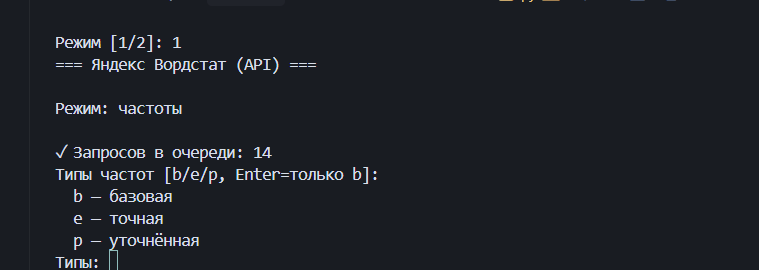
Fig. 1. Console: mode menu and b / e / p selection
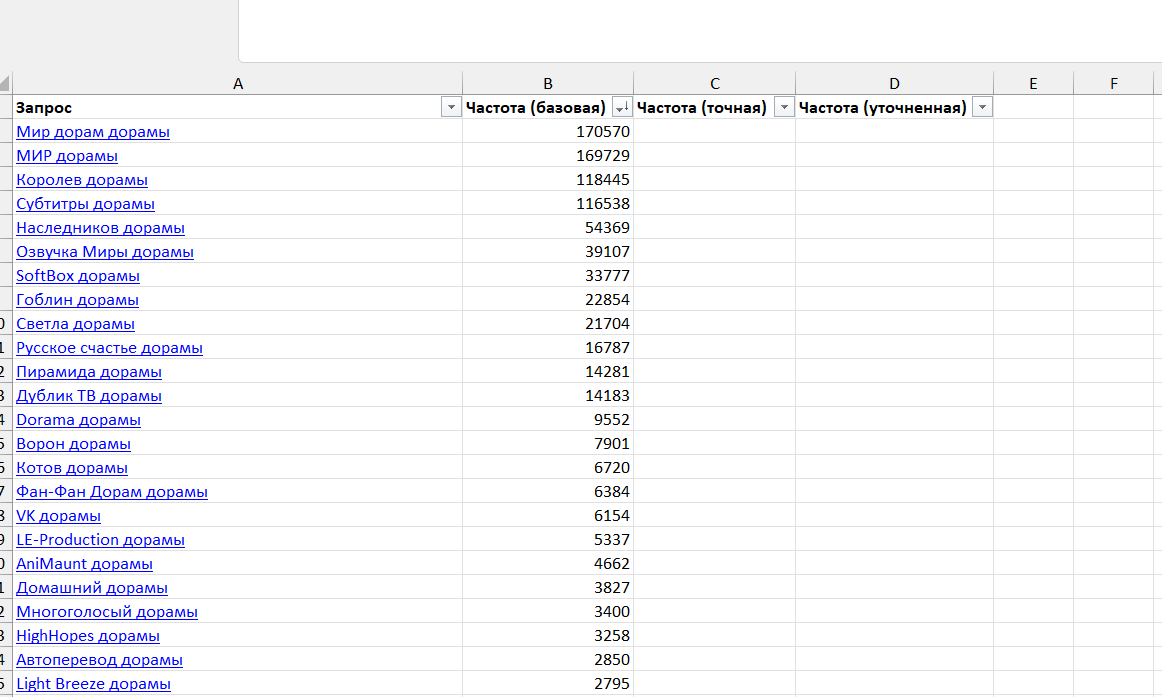
Fig. 2. Fragment of wordstat_report.xlsx
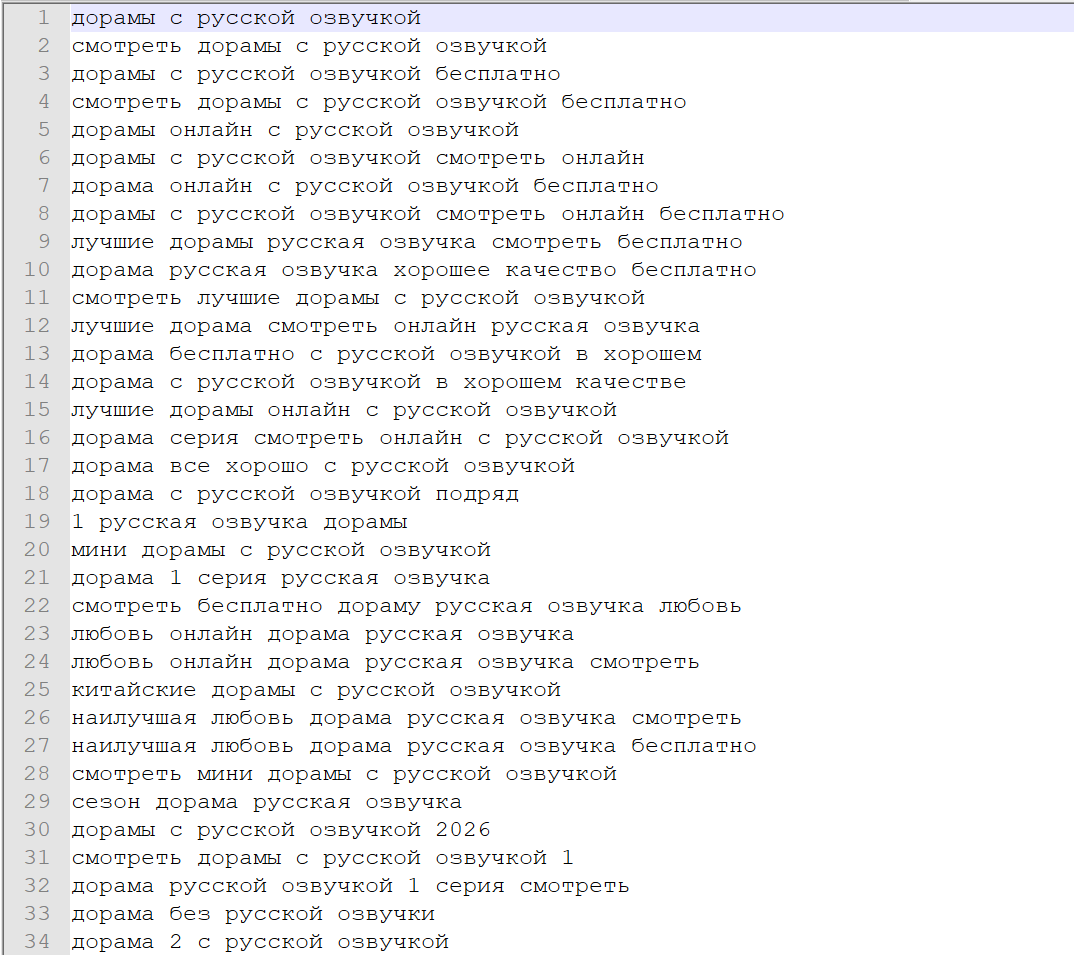
Fig. 3. Fragment of wordstat_words.txt after “Popular” collection
Progress and quota
A successfully processed seed is written to output/ immediately and removed from input/queries.txt. A rerun continues from remaining lines; Excel and the words file are appended, not overwritten.
On a streak of 429 responses the script stops after 10 in a row — progress is already saved, you can return later. Pause between requests is ~0.25 s.
Practical workflow:
- Seed list → phrase collection mode → large
wordstat_words.txt. - Clean the list, put it in
queries.txt. - Frequency mode with
--freq-types b— maximum phrases per hourly quota. - Run exact/precise selectively (
be/bep) on the filtered core.
API limits
Default for Wordstat in Cloud Search API:
| Limit | Value |
|---|---|
| Requests per hour | 100 |
| Requests per second | up to 10 |
One topRequests call = 1 quota unit (regardless of numPhrases). The console “Quotas” page may not list Wordstat separately — the limit still applies via HTTP 429.
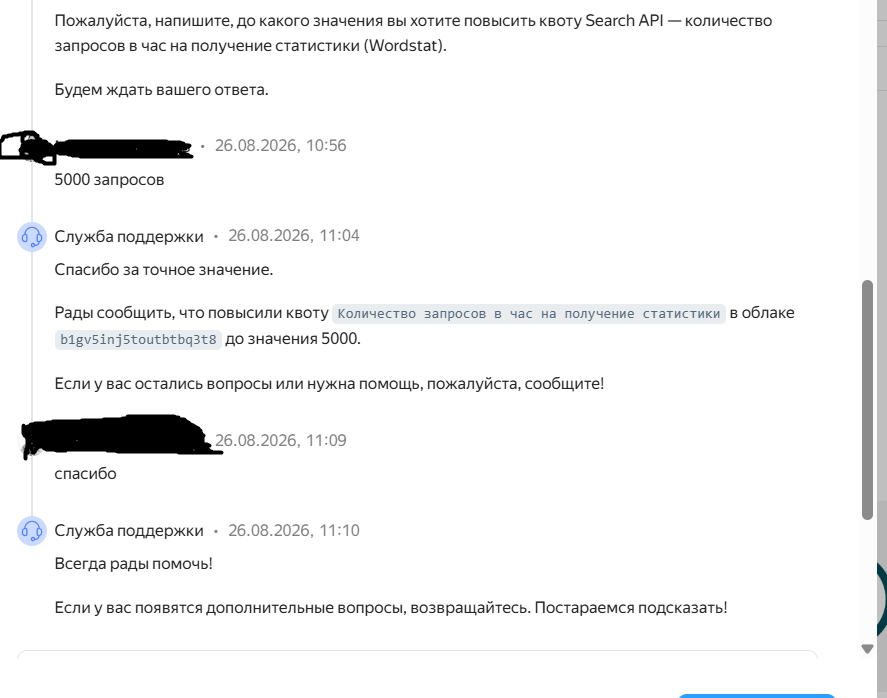
Fig. 6. Support ticket: raising “requests per hour for statistics” quota to 5000
Wordstat may not appear in the Quotas section, but support can raise the limit — the screenshot shows a reply from 26.08.2026 with 5000 requests/hour.
Increase via Yandex Cloud support: ticket with cloud ID, folder ID, billing account ID, and desired quota (e.g. 5000/hour). I don’t attach the secret key — describing authorization is enough (API key, scope yc.search-api.execute, role search-api.webSearch.user).
How to get an API key
The script uses Yandex Cloud Search API v2, not Wordstat OAuth or a browser. You need two values:
| Parameter | Example | Where |
|---|---|---|
api_key |
AQVN... |
secret key |
folder_id |
b1... |
Cloud folder ID |
Both go in data/credentials.txt (template — data/credentials.example.txt). The file is in .gitignore — do not commit to GitHub.
1. Account and billing
- Sign up at Yandex Cloud Console.
- Link a payment account / card (billing is often required even for test calls).
2. Folder
- Create a folder in the console (not a “resource”).
- Copy the ID from the URL:
https://console.yandex.cloud/folders/b1xxxxxxxxxxxxxxxxxxxx/dashboard
                                      ↑ this is folder_id
Or: folder page → Overview → Identifier.
3. Service account and role
- Folder → IAM → Service accounts → create.
- Assign role on the folder:
search-api.webSearch.user.
4. API key
- Open the service account → API keys → Create API-key.
- Under Scope select:
yc.search-api.execute. - Save the secret (
AQVN...) immediately — shown only once.
Done in console.yandex.cloud, not necessarily in AI Studio.
5. Credentials file
api_key=AQVN_YOUR_SECRET_KEY
folder_id=b1_YOUR_FOLDER_ID
6. Key check (PowerShell)
Before a bulk run I verify with one request:
chcp 65001 | Out-Null
[Console]::OutputEncoding = [System.Text.Encoding]::UTF8

$apiKey   = "AQVN...."
$folderId = "b1...."
$uri = "https://searchapi.api.cloud.yandex.net/v2/wordstat/topRequests"

$body = @{ phrase = "seo оптимизация"; numPhrases = 5; folderId = $folderId } | ConvertTo-Json
$bytes = [System.Text.Encoding]::UTF8.GetBytes($body)

Invoke-RestMethod -Uri $uri -Method POST `
  -Headers @{ Authorization = "Api-Key $apiKey" } `
  -ContentType "application/json; charset=utf-8" `
  -Body $bytes
Success: response contains totalCount and results.
| Code | Usually means |
|---|---|
| 401 | invalid api_key |
| 403 | missing role / scope / billing |
| 400 | invalid or empty folder_id |
| 429 | limit exceeded (~100/hour) |
Install and run
python -m venv .venv

# Windows
.venv\Scripts\activate
# Linux/macOS
source .venv/bin/activate

pip install -r requirements.txt
Queries go in input/queries.txt, minus-words in input/stop_words.txt.
python wordstat_api.pyWithout the menu:
python wordstat_api.py --mode 1 --freq-types b
python wordstat_api.py --phrases--freq-types: b / e / p or base,exact,precise. Without the flag — broad only.
Dirty phrases: quotes, “Oh!”, and 400 Invalid query
Semantics often includes quoted titles (Studio "Rakurs" dramas) or Oh!. A raw seed easily gets HTTP 400 Invalid query.
The script normalizes the string: strips quotes and !, plus &, /, |, etc. Exact/precise frequency operators are applied separately — don’t put them in the seed.
If normalization leaves an empty query or the API returns 400, the seed goes to output/invalid_queries.txt and is removed from the queue.
Who it’s for — and when it’s not
Good fit if you:
- work with lists and files, not one-off clicks;
- are willing to set up Cloud and a key once;
- plan batches around the hourly quota.
Not a replacement for browsing Wordstat visually: regions, associations, UI analytics — not implemented yet. The script solves a narrow task: bulk totalCount and top phrases via API.
Links
- Tool on this site: Wordstat Parser API
- Repository: github.com/google-dad/wordstat-parser-api
- Yandex Cloud Console
- Wordstat API docs
- Managing API keys
Keep your key out of git. Screenshots in this article and the repo show no secrets.
Related
Related Tools
Wordstat Parser API — Python CLI for Yandex Cloud Search API — keyword frequencies and popular phrases without a browser.