HH.ru apply assistant: a Telegram agent with manual approval
Checking fresh HH vacancies by hand gets old: the same queries, dozens of cards, half of them irrelevant. I wanted a helper that walks the results, drops obvious junk by title, and sends Telegram the ones worth a look — and applies only after I decide. Paid “auto-apply on HH.ru” services already exist. This is the same class of task, with open code and no subscription.
I took the open hh-ai-agent and forked it as hh-ai-agent-advance. The script is generic: you plug in your queries, résumé, and stop-words. It fits a developer, analyst, marketer, SEO, or any other role. Below is the workflow, setup, and day-to-day use. The examples are SEO vacancies, because that is how my working profile is set.
The important difference from upstream: the original calls an LLM on every vacancy (“fit / not a fit”, and often writes the letter immediately). On reasoning models that burns the budget fast. In this fork the search loop does not call the model. The letter is generated only from a Telegram button, after the vacancy is already interesting.
→ github.com/google-dad/hh-ai-agent-advance
“Auto-apply” here means automatic search and preview, plus an application only after your button. There is no mass send without a person in the loop — on purpose.
How it runs
- From
search_queriesthe agent looks up fresh vacancies on HH. - The title passes a local filter (stop-words, your exclusions, role markers).
- The browser opens the card and reads the description and company rating.
- A preview arrives in Telegram.
- You press “Generate letter” (LLM) → edit the text if needed → “Apply” or “Skip”.
A card without a letter has two buttons: “Generate letter” and “Skip”. After generation you get the letter text plus “Apply” / “Edit letter” / “Skip”.
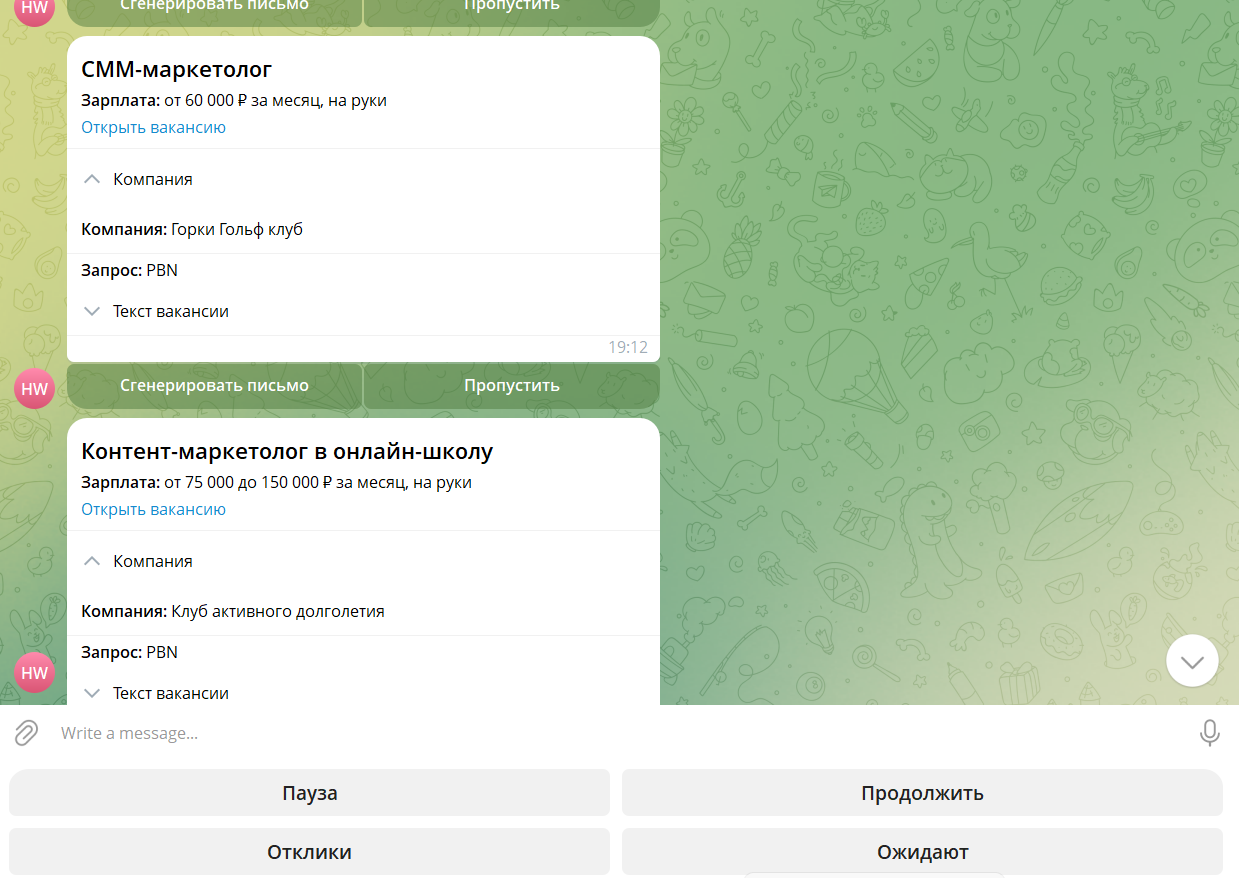
Fig. 1. A preview before the letter. The keyboard below: Pause, Resume, Applications, Pending.
A real application is possible only when three things are true at once: mode approval, flag ENABLE_REAL_APPLY=true, and the button pressed from your Telegram ID.
Why the LLM does not score every vacancy
Say a cycle finds ~40 vacancies, the title filter leaves ~12 cards, and you request a letter for 3 of them.
| Approach | LLM calls | Token outcome |
|---|---|---|
| Score + letter on every card | ~40 scores, and often letters immediately | expensive, especially on reasoning models |
| This fork | 0 scores in the loop + letters on button | tokens only for the applications you chose |
The filter and a quick look cover most of the drop. The model is for the letter text, not for hundreds of automatic suitable verdicts.
Install
You need Python 3.11+, a Telegram bot and your user ID, a browser (CloakBrowser or Playwright), and an LLM if you will generate letters (Ollama / Mistral / an OpenAI-compatible API such as Together).
git clone https://github.com/google-dad/hh-ai-agent-advance.git
cd hh-ai-agent-advance
py -3.12 -m venv .venv
.\.venv\Scripts\activate
pip install -r requirements.txt
python setup_wizard.py
python main.py --check-config
python main.py --check-llm
python main.py
The wizard writes a local .env and profile.yaml (neither is in git). Later edits: python setup_wizard.py --edit, or by hand in the YAML.
Modes:
| Mode | Behavior |
|---|---|
dry_run |
Search and cards without apply buttons — start here |
approval |
You can generate a letter and apply after your button |
Telegram bot
The bot is a separate Telegram account the script uses to send cards. You create it once; the token and your user ID go into .env.
- Open @BotFather and send
/newbot. Set a display name and a username (it must end inbot). The reply includes a token like123456789:AA.... - Get your numeric user ID: send anything to @userinfobot. This is not your username — the bot replies with a number.
- Bind the bot to the script.
python setup_wizard.pyasks for the token and user ID and writes them to the local.env. By hand, the same fields:
TG_BOT_TOKEN=123456:your_bot_token
TG_USER_ID=your_numeric_id- Run
python main.pyand send/startto your bot. Cards and apply buttons are accepted only from thisTG_USER_ID: someone else’s chat with the bot will not submit an application.
To change the token or ID later: python setup_wizard.py --edit. Do not commit .env.
profile.yaml
The specialty is not an “SEO mode”. It is whatever you put in the profile: search queries, résumé name, stop-words, and the facts the letter is written from.
Required
| Field | What it does |
|---|---|
candidate.name |
Name in the letter prompt |
candidate.desired_positions |
Target roles for the letter (not HH search strings) |
candidate.experience_summary |
Experience — the main fact block for the LLM |
hh.resume_name |
Exact résumé name in the HH selector when applying |
hh.search_queries |
Queries the agent searches |
Search and filtering
| Field | What it does |
|---|---|
hh.areas |
HH region IDs (1 Moscow, 2 Saint Petersburg). [] means no geo filter. Do not write “Moscow” as text |
hh.experience_filters |
noExperience / between1And3 / between3And6 / moreThan6, or [] for any experience |
candidate.work_format |
If it contains “удалённо” or remote, the search adds schedule=remote |
candidate.excluded_positions |
Extra stop-words in the title (intern, junior, unrelated roles) |
cover_letter.max_length |
Letter character limit (HH’s field is about 10,000) |
cover_letter.language / style |
Letter language and tone |
The full field list is in the README and in commented profile.example.yaml.
The title filter in code (vacancy_filter.py) defaults to SEO role markers and typical noise (SMM, ads, sales…). For another specialty:
- set your own
search_queriesandexcluded_positionsin the profile; - if needed, edit
ROLE_KEYWORDS/BLOCK_WORDSinvacancy_filter.pyto your role markers (titles without those markers are dropped asno-role).
Example: SEO (my profile)
A sketch of profile.yaml (no personal data, no secrets):
candidate:
  desired_positions:
    - "SEO-специалист"
    - "SEO Team Lead"
    - "Линкбилдер"
  work_format:
    - "удалённо"
  excluded_positions:
    - "Junior SEO"
    - "Стажёр"
    - "SMM-менеджер"
    - "Таргетолог"

hh:
  resume_name: "SEO-специалист"
  search_queries:
    - "SEO-специалист"
    - "SEO Team Lead"
    - "линкбилдер"
    - "техническое SEO"
    - "PBN"
  areas: []
  experience_filters: []

cover_letter:
  language: "ru"
  max_length: 8000
  style: "professional"
For another role, change the queries and stop-words — Python developer, data analyst, product manager — same shape.
LLM for letters
The model does not affect selection in the search loop. It is used for “Generate letter”, /keys, and --check-llm.
- Ollama — local, no cloud keys
- Mistral / OpenAI-compatible (Together, Groq…) — a key pool via
/keysin Telegram
Together example in .env (values are placeholders):
LLM_PROVIDER=openai_compatible
LLM_MODEL=openai/gpt-oss-120b
OPENAI_COMPATIBLE_BASE_URL=https://api.together.xyz/v1
OPENAI_COMPATIBLE_API_KEY=your_key
LLM_KEYS_MASTER_KEY=your_fernet_master_key
LLM_TIMEOUT_SECONDS=90
LLM_MAX_OUTPUT_TOKENS=4000
On reasoning models some tokens go to internal reasoning — for letters keep LLM_MAX_OUTPUT_TOKENS with headroom (~3500–4000).
Day to day
- Run
python main.py. Log in to HH if needed (BROWSER_HEADLESS=false). - Wait for cards in Telegram (
/status,/diagnostics— loop state). - Skip what you do not want. For the rest: “Generate letter”, read, edit, “Apply”.
- Pause search with
/pause//resume. Decision queue:/pending.
If no cards arrive, check the logs: title filter, duplicates in agent.db, pause, circuit breaker. Before a clean run, stop the agent and back up the database.
Commands: /start, /status, /pause, /resume, /pending, /stats, /diagnostics, /keys, /cancel.
Who it fits — and when it does not
It fits if you:
- work in any specialty and are willing to set queries and the filter once;
- want automatic search and Telegram previews, with the application under your control;
- do not want to burn an LLM on every row of the results;
- are fine with Python and browser automation.
It does not fit if you need:
- a fully headless mass apply;
- a guarantee of bypassing detection, CAPTCHA, and HH limits;
- a replacement for reading the vacancy and the letter before sending.
Automating HH.ru may break the service rules. The account risk is yours. Use it as an assistant with approval, not as a spray across the market.
Links
- Fork: github.com/google-dad/hh-ai-agent-advance
- Upstream: github.com/fikstt2/hh-ai-agent
- Bot: @BotFather, your ID: @userinfobot
Keep Telegram tokens, API keys, and your personal profile.yaml out of git. This article has no secrets.
Related
Related Tools
HH AI Agent — Python agent for HH.ru — job search, Telegram previews, and an application only after your button.